Build your content
Your content starts as one vertical auto-layout frame. Its direct children are the blocks, in reading order. That is the whole contract.
The source frame
- Create a frame, set vertical auto layout, give it the width of your template’s content area.
- Add your content as its children: headings, paragraphs, cards, tables, figures, component instances, groups.
- Order it the way it should read, top to bottom.
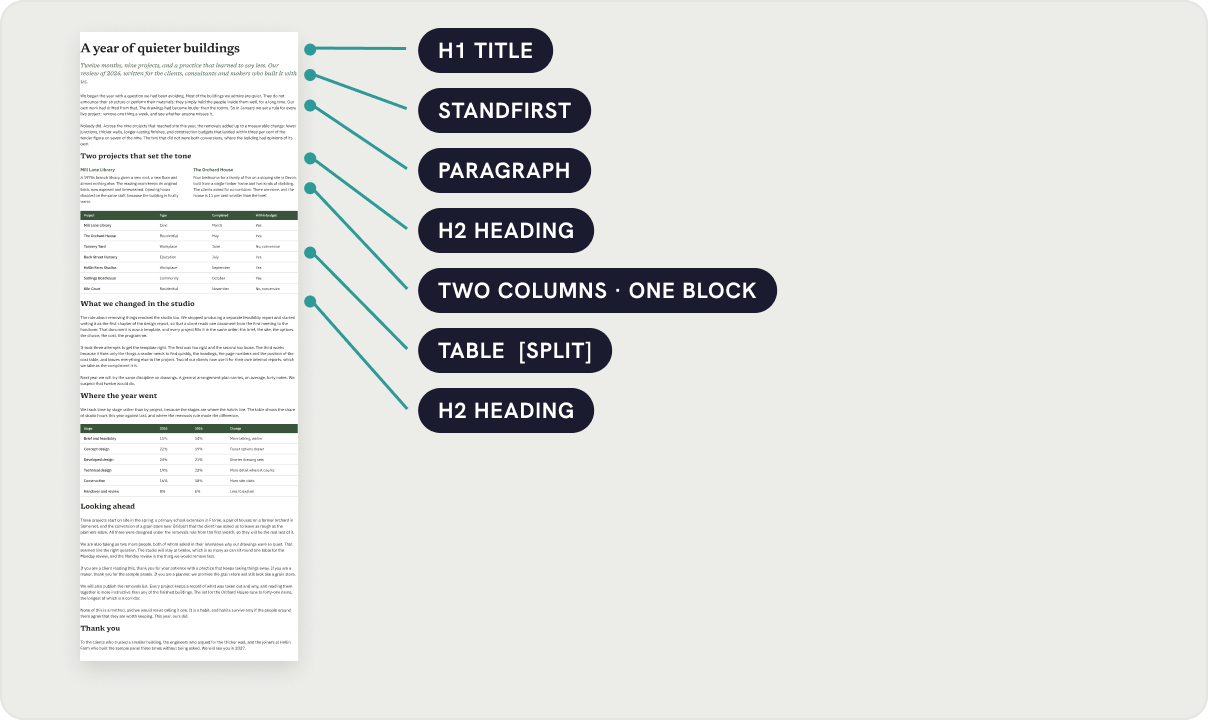
What makes a good block
- A paragraph is a text layer with a fixed width and auto height. That is the default for text inside an auto layout set to Fill.
- A card, a figure or a table is a frame. It moves whole unless you tag it as splittable.
- Two or three columns are one horizontal auto-layout frame. Pagestream never breaks inside it.
- Component instances work like frames. A signed-off chart stays a chart.
Width
Blocks set to Fill keep filling the content width of the page. Fixed-width blocks keep their width and sit at the left. Mixed widths are fine; the page just needs to be at least as wide as the widest block.
Layer names carry the rules
Pagestream reads two things from a block’s layer name, and nothing else.
| Name | Effect |
|---|---|
H1 Title, H2 Section, Heading | Keep with next: the block never ends a page. It moves with the block after it. |
Any name with [keep] | The same, for a block whose name does not look like a heading. |
Any name with [split] | May break between its children. For tables and long lists. A first child named "Header" is repeated. |
Pull quotes, callouts and figures
Make them frames with a vertical auto layout and they behave like any other block. A pull quote is a frame with a tinted fill, a left rule and two text layers. Drop it between two paragraphs in the source frame, or later into any page.
Importing text
Paste from a document into one text layer, then split it into paragraphs with Figma’s own tools, or keep it as one long text block: Pagestream splits a long paragraph at a line boundary when it has to. Markdown and Google Docs import are on the roadmap.